- Automation multiplies whatever you feed it. Map and fix the process first, clean the data, and write down the job before you look at a single tool.
- Pilot on real work with a small group and a time box, and design the handover to a person before launch, not after the first failure.
- Record the baseline before switching anything on, and give the automation a named owner with a monthly check, because the business around it keeps changing.
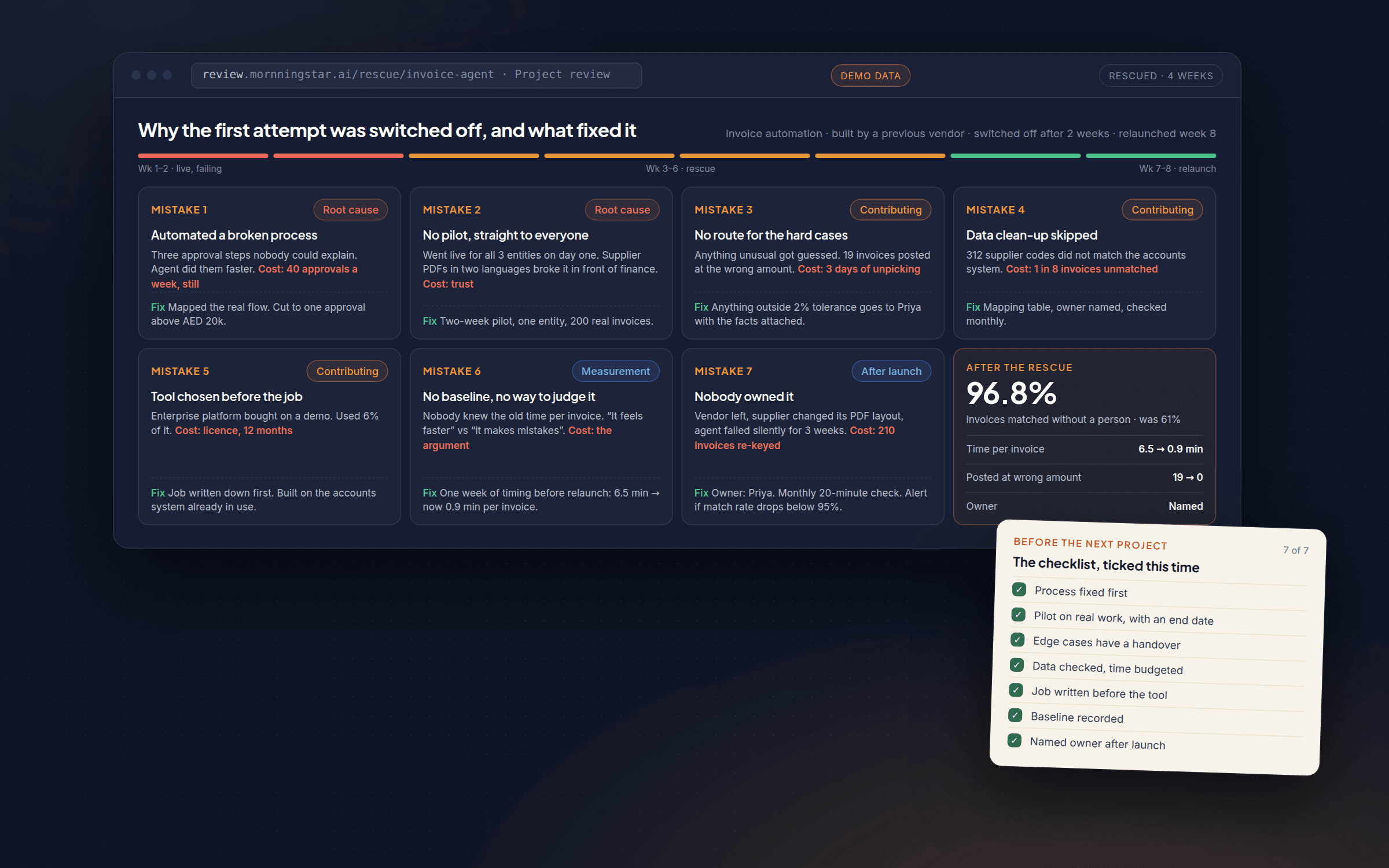
We have been called in to fix more AI projects than we would like: automations switched off after two weeks, chatbots nobody trusts, pilots that quietly died because no one could say whether they worked. The mistakes behind them are rarely about the technology. They are about how the project was set up. Here are the seven we see most often, and what to do instead.
1. Automating a process before fixing it
The most common mistake is speeding up a process that is broken. If your invoice approval has three unnecessary sign-offs, an agent will now do those three unnecessary sign-offs faster. If your lead form asks for information nobody uses, automating the follow-up does not fix that; it runs the bad process on autopilot.
Automation is a multiplier. It multiplies whatever you feed it, good or bad.
The fix: map the process first. Watch how the work actually happens today, not how it is supposed to happen on paper, and cut the steps that do not earn their place. Only then decide what to hand to AI. This is the first thing we do on every project, and it is worth doing even without an outside team.
2. Skipping the pilot
It is tempting to roll a new tool out to the whole team on day one. Everyone is excited, the demo worked, why wait? Because a demo running on ten clean examples and a live system running on your messiest real cases are two different things. The edge cases you did not think of arrive in week one: the customer who writes in three languages in one email, the invoice with a typo in the amount, the lead who submits the form twice. Without a pilot those problems surface in front of your whole team and your customers at once, often loudly enough that someone decides to just turn it off.
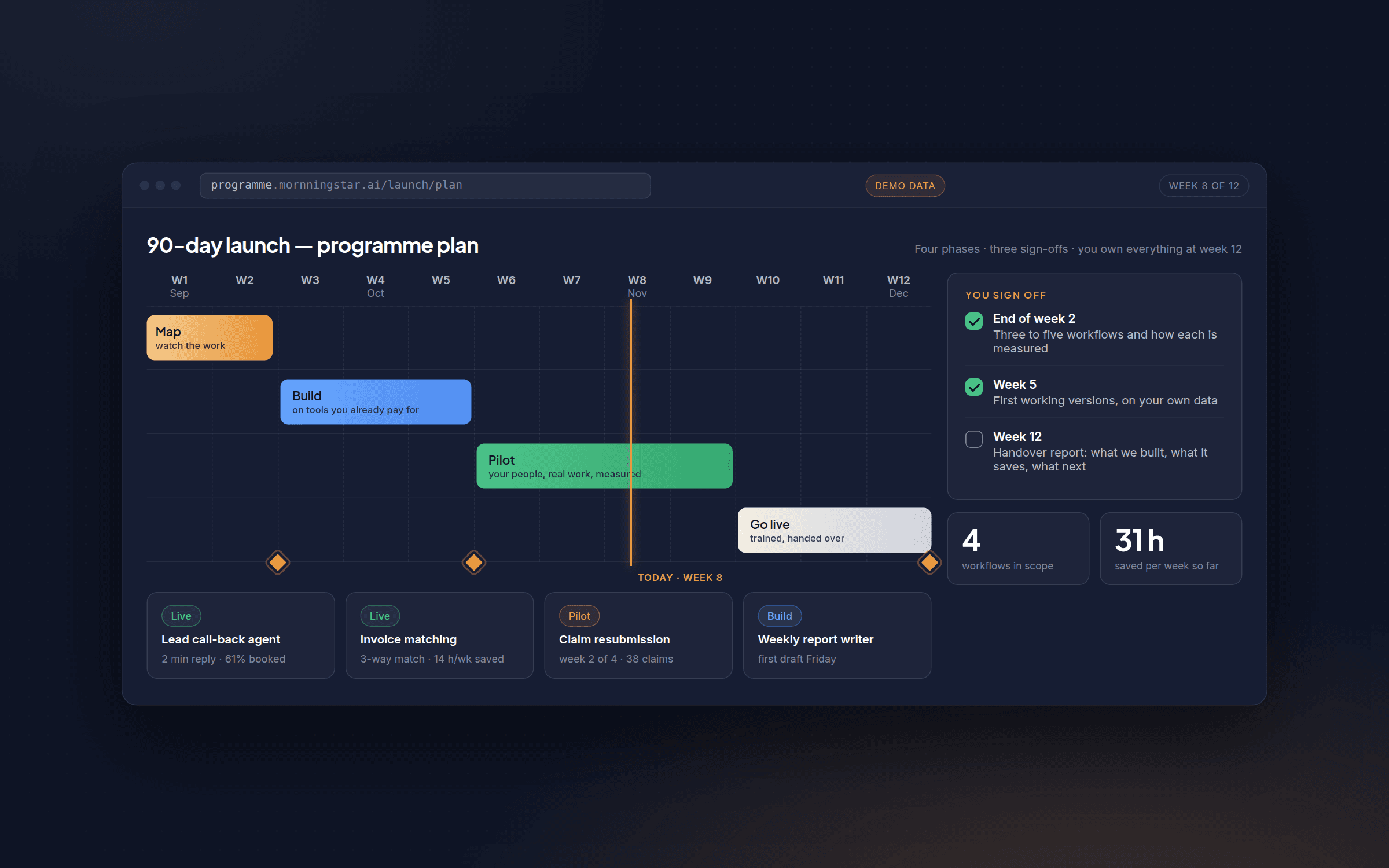
The fix: run a small pilot with a limited group on real work, with a clear time box. A few weeks is usually enough to find the edge cases while the stakes are low. It is why our 90-day programme reserves weeks specifically for piloting before anything goes company-wide.
3. No path for the cases it cannot handle
Many teams build an automation meant to handle every case, with no route for the ones it cannot. When the agent meets something it was not built for (an unusual request, a policy exception, a customer who is clearly upset) it either guesses or breaks, and both are bad with a customer watching. Agents are good at the routine majority of a task. They are not good at knowing what they do not know, unless you build that in.
The fix: decide up front what the agent handles alone and what it hands to a person, and build a clean handover for the second case. A good automation makes it obvious when it is out of its depth and passes the work along with the facts ready. Plan it as part of the design, not as a patch after something goes wrong.
4. Underestimating the data clean-up
Every project runs on data: customer records, product catalogues, past tickets, price lists. Most businesses assume theirs is roughly fine. Most are wrong. Duplicate customers, inconsistent product codes, fields that mean different things in different systems, years-old records nobody has touched. This is normal, and it is the single biggest reason AI projects take longer than planned. Skip it and you get an agent that answers confidently from bad information, which is worse than one that does not answer at all.
The fix: budget real time for it and treat it as a distinct step, not an afterthought. Our note on data readiness covers what that involves. Read it before you scope a project, not after.
5. Choosing the tool before defining the job
A lot of projects start backwards. Someone sees a demo, likes it, and goes looking for a use case to justify buying it. That usually ends with an expensive platform doing a job a simpler automation could have done, or doing the wrong job entirely. The tool should follow the job. A five-minute task done fifty times a day needs a different answer from a complex judgement call made twice a week.
The fix: write the job down (what triggers it, what decision has to be made, what the output looks like) before you evaluate a single tool. Once the job is clear, the right tool, bought or built, is a much easier choice. Our strategy work exists mainly to get this step right before money is spent on development.
6. No way to tell whether it worked
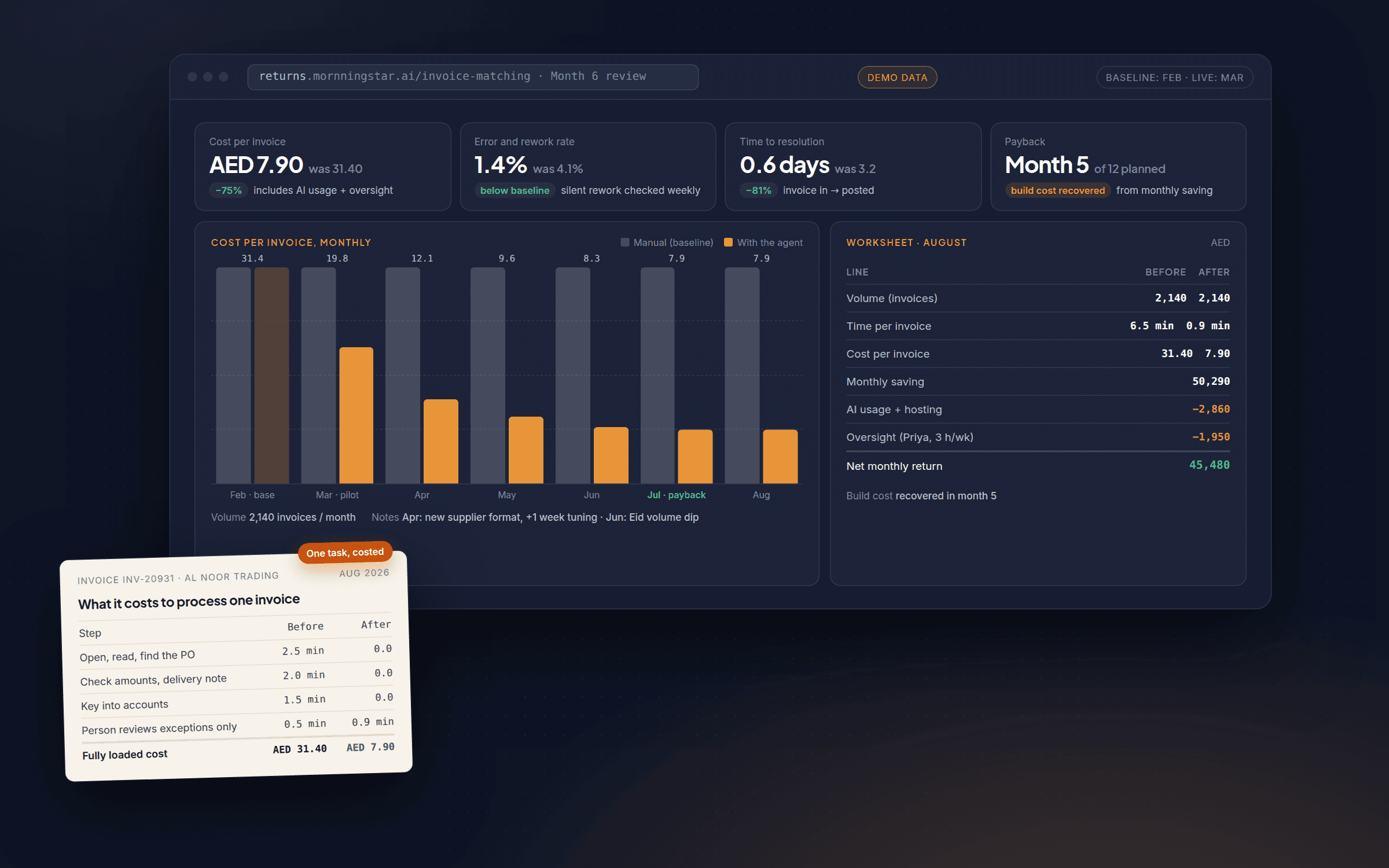
We ask every prospective client the same question: how will you know if this worked? Surprisingly often the honest answer is “we won’t”. No baseline was recorded before the automation went live, so there is nothing to compare against. Or the metric being tracked (“the agent handled 400 conversations”) says nothing about whether those conversations went well. Without a measurement plan the project is judged on gut feeling, unreliable in both directions, or not reviewed at all, and quietly keeps costing money whether it works or not.
The fix: record the baseline (time per task, error rate, cost, whatever matters for this job) before you switch anything on, then track the same measure afterwards on the same basis. Our note on measuring the return walks through the four measures that hold up.
7. Treating launch as the finish line
The most expensive mistake happens after everything else went right. The pilot worked, the rollout was smooth, month one looked good, and then nobody owns it. A supplier changes its file format. A new product line launches that the automation was not built for. The person who understood it leaves. Six months later someone notices it has been quietly failing for weeks. Automations are not set-and-forget. They sit inside a business that keeps changing.
The fix: decide before launch who owns the automation once it is live, and put a light monthly check in the calendar to confirm it still does what it should. It does not need to be expensive. It needs to be someone’s job.
The checklist
Tick all seven and you are in better shape than most projects we are brought in to review. If you cannot, that is a normal place to start. It is what week one of our process is for.
Questions
Which mistake is the most expensive?
Can a project recover from these?
We are a small business. Does all of this apply to us?

Leads every 90-day programme personally. Writes these notes from the projects that shipped and the ones that did not, so you can skip the second kind.